

Single Screen vs Triple Screen: The Real Cost of Context Switching
Most people assume productivity problems are about speed.
Faster processors.
More RAM.
Better software.
But in real-world work—especially for professionals—the biggest productivity killer isn’t performance.
It’s context switching.
Context switching is the invisible tax paid every time your attention is forced to jump between windows, apps, or tasks. On a single-screen setup, that tax compounds hundreds of times per day—quietly slowing decisions, increasing fatigue, and degrading output quality.
This is the real difference between single-screen and triple-screen workflows.
What Is Context Switching (Really)?
Context switching occurs when your brain disengages from one task state and reorients to another.
In computing terms, this happens when you:
-
Alt-tab between applications
-
Resize overlapping windows
-
Minimize and restore tools
-
Reopen reference material
-
Lose visual anchors
Each switch may seem trivial.
But neurologically, it’s not.
Research consistently shows that context switching:
-
Increases cognitive load
-
Reduces accuracy
-
Slows decision-making
-
Causes mental fatigue faster
The more complex the work, the higher the penalty.
Why Single Screens Force Context Switching
Single screens don’t fail because they’re small.
They fail because they collapse multiple mental spaces into one visual surface.
Modern professional work is inherently multi-context:
-
Code + logs
-
Charts + news
-
Strategy + metrics
-
Design + assets
On one screen, these contexts are stacked instead of separated.
Your brain is constantly forced to:
-
Remember what was just hidden
-
Rebuild mental state
-
Re-locate information
This is not a workflow problem. It’s a structural limitation.
The Hidden Cost: Time You Never Notice Losing
Context switching doesn’t feel slow.
That’s what makes it dangerous.
A single switch may cost:
-
1–2 seconds to visually reorient
-
3–5 seconds to mentally re-engage
-
Longer if the task is complex
Now multiply that:
-
50–150 switches per hour
-
6–10 hours per day
The result:
-
30–90 minutes of lost productivity daily
-
Not from inactivity—but from friction
And that’s just time.
The Cognitive Cost: Fatigue Without Movement
Mental fatigue isn’t caused by working harder.
It’s caused by working inefficiently.
Single-screen users often report:
-
Feeling tired despite fewer tasks completed
-
Losing focus faster
-
Making more small errors
-
Needing frequent breaks
This happens because the brain never stabilizes into a flow state.
Flow requires:
-
Continuous visual context
-
Minimal interruptions
-
Persistent task boundaries
Single screens break all three.
Why Triple Screens Reduce Context Switching
Triple-screen setups don’t eliminate multitasking.
They eliminate task collision.
Each screen becomes a dedicated mental zone.
Instead of switching contexts, users shift attention—a crucial difference.
Attention Shift vs Context Switch
-
Context switch: Hide → recall → rebuild
-
Attention shift: Glance → reference → continue
Attention shifts are fast. Context switches are expensive.
Triple screens transform switching into shifting.
How Triple Screens Preserve Mental State
With three screens:
-
Tasks remain visible
-
Reference stays anchored
-
Progress is continuously reinforced
Your brain no longer needs to:
-
Remember what was hidden
-
Reconstruct task state
-
Re-orient repeatedly
This dramatically lowers cognitive load.
Real-World Impact by Role
Developers
-
Code remains centered
-
Logs stay live
-
Documentation stays open
Result:
-
Faster debugging
-
Fewer mistakes
-
Longer deep-focus sessions
Traders
-
Execution stays isolated
-
Charts remain persistent
-
News stays visible
Result:
-
Faster reactions
-
Fewer missed signals
-
Reduced execution errors
Founders & Executives
-
Strategy stays central
-
Metrics stay visible
-
Communication remains live
Result:
-
Better decisions
-
Faster synthesis
-
Less mental overload
Why External Monitors Don’t Fully Solve This
External monitors improve desk setups—but fail mobility.
Problems include:
-
Setup time
-
Cable dependency
-
Power management
-
Inconsistent ergonomics
-
Fragility during travel
The moment friction returns, workflows degrade again.
Context switching isn’t just about screen count—it’s about consistency.
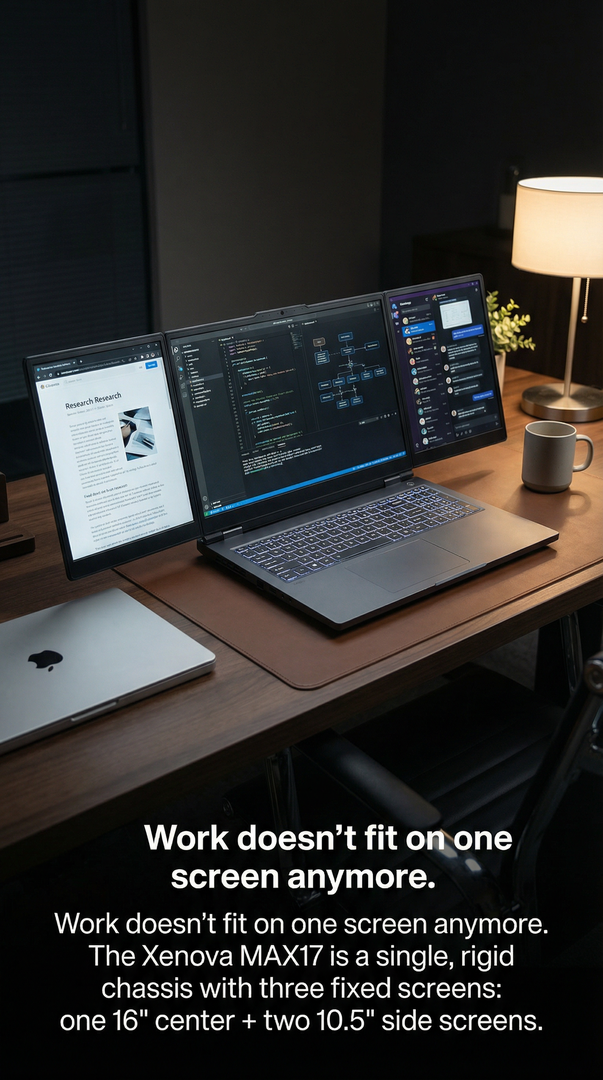
Integrated Triple Screens: A Structural Solution
When triple screens are:
-
Integrated into the chassis
-
Balanced ergonomically
-
Powered and cooled as one system
The workflow becomes:
-
Portable
-
Repeatable
-
Reliable
No setup.
No teardown.
No adaptation required.
This is when context switching truly disappears.
The Psychological Shift Users Report
Users moving from single to triple screens consistently report:
-
“I don’t lose my place anymore.”
-
“I think faster without rushing.”
-
“My work feels calmer.”
-
“I end the day less exhausted.”
These aren’t emotional reactions. They’re cognitive outcomes.
Why This Matters More Than Performance Specs
Faster CPUs don’t fix poor workflows.
More RAM doesn’t reduce mental friction.
Better GPUs don’t improve decision clarity.
Screen topology does.
The way information is spatially arranged matters more than how fast it loads.
The Long-Term Cost of Staying Single-Screen
Staying on one screen means:
-
Slower learning curves
-
Higher error rates
-
Faster burnout
-
Lower output quality over time
These costs compound silently.
Most professionals never connect them to screen limitations.
The Future of Professional Computing
As work becomes:
-
More data-dense
-
More real-time
-
More decision-driven
Single-screen computing becomes a liability.
Multi-screen workflows are not an upgrade. They are a correction.
Final Thought
The cost of context switching isn’t measured in seconds.
It’s measured in:
-
Missed details
-
Slower decisions
-
Mental fatigue
-
Lost creative momentum
Triple screens don’t make you work harder.
They let your brain work the way it was meant to— with clarity, continuity, and control.
Once context stays visible, everything else moves faster.


Leave a comment
This site is protected by hCaptcha and the hCaptcha Privacy Policy and Terms of Service apply.