

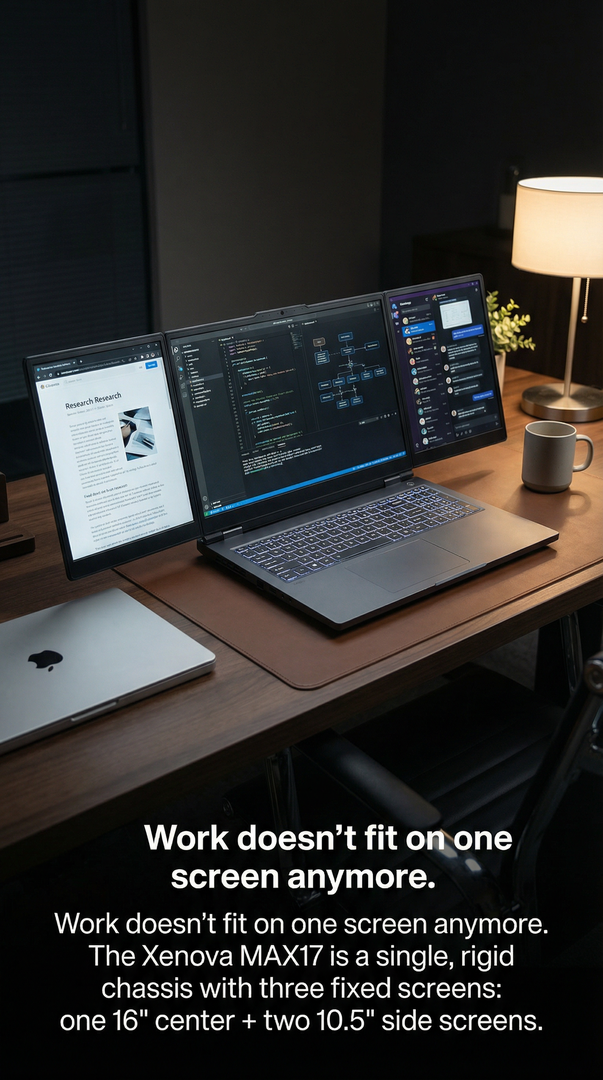
Why Triple-Screen Laptops Are Replacing Monitors - And Why Xenova Leads the Category
For decades, productivity followed a simple rule:
Laptop for mobility.
Monitors for real work.
That assumption is now breaking.
Across industries—technology, finance, healthcare, logistics, and leadership—professionals are quietly moving away from fixed monitors and toward integrated multi-screen laptops.
Not because monitors are bad.
But because static workstations no longer match how work actually happens.
Triple-screen laptops aren’t replacing monitors by accident.
They’re replacing them because the fundamentals of work have changed.
The Monitor Era Was Built for a Different World
Traditional monitor setups assume:
-
A fixed desk
-
A fixed location
-
A predictable workday
-
A single primary workflow
That model worked when:
-
Work was office-bound
-
Tools were slower
-
Collaboration was asynchronous
-
Context switching was minimal
Modern work breaks all of those assumptions.
Why Monitors Are Becoming a Bottleneck
Monitors deliver screen space—but at a cost.
1. Location Dependency
Monitors tie productivity to a desk.
The moment you move:
-
The setup disappears
-
Workflow degrades
-
Efficiency resets
In a world of hybrid work, this is a liability.
2. Setup Friction
Monitors require:
-
Cables
-
Power
-
Adapters
-
Desk space
-
Alignment
Every setup introduces friction.
Every teardown disrupts flow.
High performers avoid friction wherever possible.
3. Inconsistent Ergonomics
Different desks.
Different monitor heights.
Different chair positions.
The result:
-
Neck strain
-
Eye fatigue
-
Poor posture
Portability demands consistency—not improvisation.
4. Fragmented Workflows
Monitors don’t travel with your workflow.
You rebuild context:
-
At home
-
At the office
-
In meetings
-
On-site
-
While traveling
Each rebuild costs time, focus, and accuracy.
Why Triple-Screen Laptops Are Taking Over
Triple-screen laptops solve the problem monitors can’t:
They move the workstation—not just the computer.
Mobility Without Compromise
Triple-screen laptops deliver:
-
Desktop-level visual real estate
-
Laptop-level portability
-
Zero setup time
Open the device.
Your full workspace is already there.
Context That Never Disappears
With three integrated displays:
-
Tasks remain visible
-
Reference stays anchored
-
Decisions happen faster
There’s no “rebuild phase.”
Work resumes instantly.
Consistency Across Environments
A triple-screen laptop:
-
Looks the same everywhere
-
Feels the same everywhere
-
Works the same everywhere
Consistency is productivity.
Why External Monitor Alternatives Fall Short
Many brands attempt halfway solutions:
-
Clip-on side screens
-
Magnetic displays
-
USB-powered add-ons
These fail because they are accessories, not systems.
Common problems:
-
Cable clutter
-
Power drain
-
Weight imbalance
-
Software instability
-
Fragile mounting
They recreate monitor problems—just smaller.
Why Integration Matters More Than Screen Count
Three screens alone aren’t enough.
What matters is how those screens are built into the system.
True replacement of monitors requires:
-
Structural integration
-
Balanced hinges
-
Unified thermal design
-
Single power architecture
-
Software-aware hardware
This is where most attempts fail.
Why Xenova Leads the Category
Xenova didn’t start by adding screens.
It started by redesigning the laptop around multi-context work.
That distinction matters.
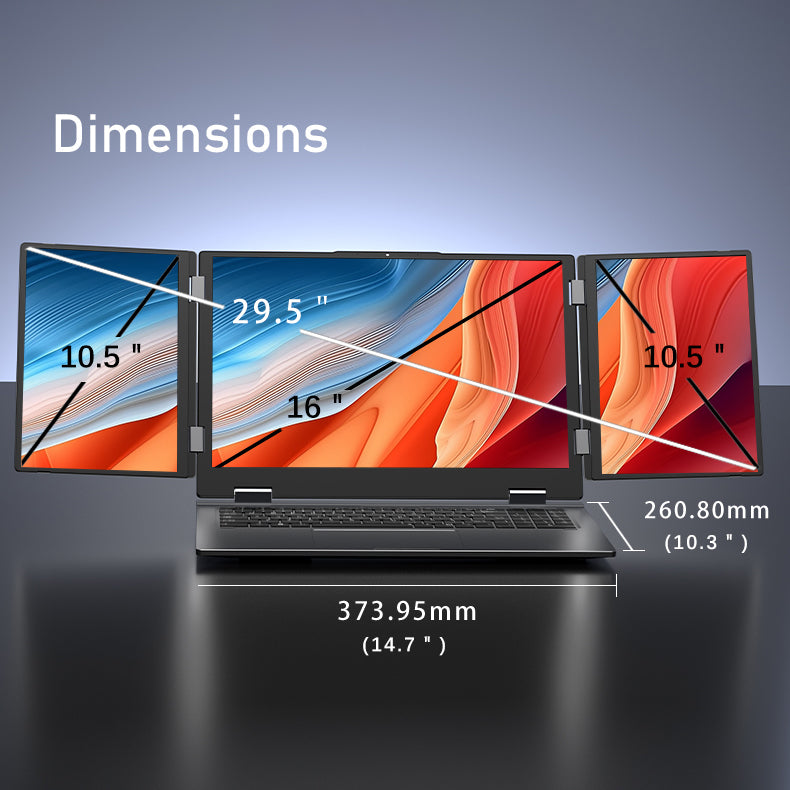
1. Screens Are Structural, Not Attached
Xenova’s displays are part of the chassis—not add-ons.
This means:
-
No wobble
-
No misalignment
-
No cable dependency
-
No external power
The laptop remains a single system.
2. Folding Architecture Is Purpose-Built
Xenova’s folding system:
-
Preserves a fixed central display
-
Allows left and right screens to deploy naturally
-
Maintains viewing symmetry
There are no awkward angles.
No collapsed ergonomics.
3. Keyboard and Input Are Never Compromised
Many multi-screen concepts sacrifice:
-
Physical keyboards
-
Trackpads
-
Traditional input
Xenova preserves:
-
Full keyboard
-
Precision trackpad
-
Familiar workflow
This makes it usable all day—not just impressive.
4. Designed for Manufacturing, Not Demos
Most multi-screen devices:
-
Appear at trade shows
-
Never reach mass production
-
Lack support lifecycles
Xenova is built to ship, scale, and support.
That’s the difference between concept and category.
Why Monitors Will Still Exist (But Play a Smaller Role)
Monitors won’t disappear entirely.
They’ll remain:
-
In control rooms
-
On specialized desks
-
In fixed installations
But they will no longer be the default.
For most professionals, mobility now matters more than maximum size.
Triple-screen laptops hit the new balance point.
Industry Adoption Is Already Underway
Developers
Code, logs, and documentation stay visible without docking.
Traders
Live charts replace static monitor walls.
Healthcare
COWs and WOWs are replaced by mobile workstations.
Logistics
Dashboards move from desks to docks.
Executives
Strategy travels with the decision-maker.
Why This Shift Is Permanent
This isn’t a trend driven by novelty.
It’s driven by:
-
Hybrid work
-
Faster decision cycles
-
Increased data density
-
Reduced tolerance for friction
Once professionals experience uninterrupted context, they don’t go back.
Why Xenova Isn’t Chasing the Market
Xenova isn’t reacting to monitor decline.
It anticipated it.
By designing a laptop that replaces:
-
Monitors
-
Docking stations
-
External displays
-
Desk dependency
Xenova didn’t improve the laptop.
It redefined the workstation.
The Strategic Advantage of Leading a Category
Being first matters because:
-
Standards get set early
-
Expectations form around the pioneer
-
Copycats chase, leaders define
Future devices may resemble Xenova.
But the reference point is already established.
Final Thought
Monitors solved yesterday’s problems.
Triple-screen laptops solve today’s.
Xenova leads not because it has more screens, but because it understands how professionals actually work now.
The workstation is no longer a place. It’s a device. And it moves with you.


Leave a comment
This site is protected by hCaptcha and the hCaptcha Privacy Policy and Terms of Service apply.